/connect [UUID]
LegacyThe old way to link a Discord account, kept for existing users. Link from the account page instead.
Use the invite below to add the bot with the permissions needed to respond with commands and image outputs.
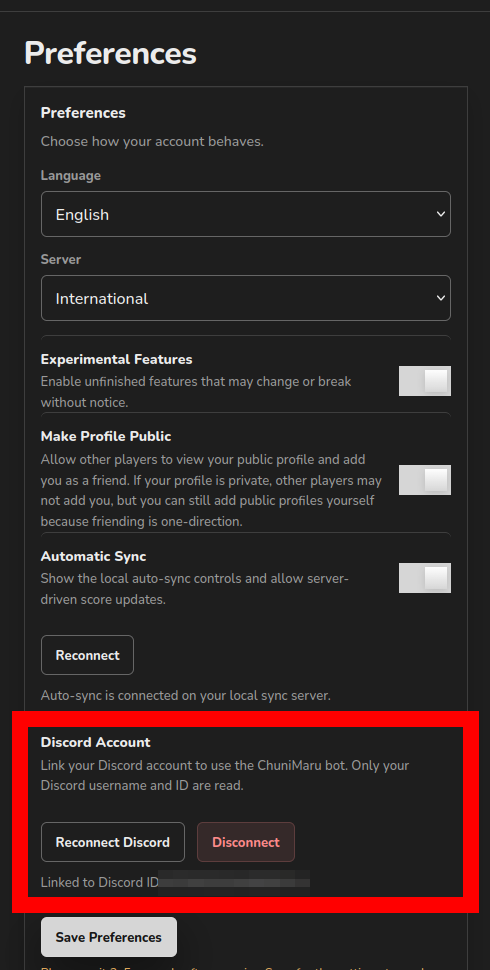
Invite to DiscordEvery bot command reads your ChuniMaru profile, so the bot needs to know which profile is yours. Link once on your account page.
To let the bot pull fresh scores, connect Automatic Sync in the same Preferences panel. Without it the bot can still read what is already on your profile, but /sync has nothing to sync with.
Slash command updates can propagate very slowly on Discord. If a new option does not appear immediately, give the global command cache some time to refresh.
The old way to link a Discord account, kept for existing users. Link from the account page instead.
Updates your profile using the Automatic Sync connection stored on your account page.
Reconnects Automatic Sync from Discord when the stored connection expires. Opens a private form for your SEGA ID; the credentials are used once to fetch a new connection and are never stored.
Generates an image of your best songs from your linked ChuniMaru profile. If you mention another Discord user, it only works when that user has a linked public ChuniMaru profile.
Searches a song by title or alias and shows chart details with your linked score, rank, rating, clear status, and attempts when Automatic Sync is connected. Mention another linked Discord user with vs to compare records.